
Understanding SMTP Ports
SMTP (Simple Mail Transfer Protocol) is the backbone of email communication on the web. Whether you’re sending a casual message to a friend or managing a business’s email infrastructure, understanding SMTP ports is crucial. In this article, we’ll delve into the world of SMTP ports, demystify their significance, and help you choose the right one for your needs.
What Is an SMTP Port?
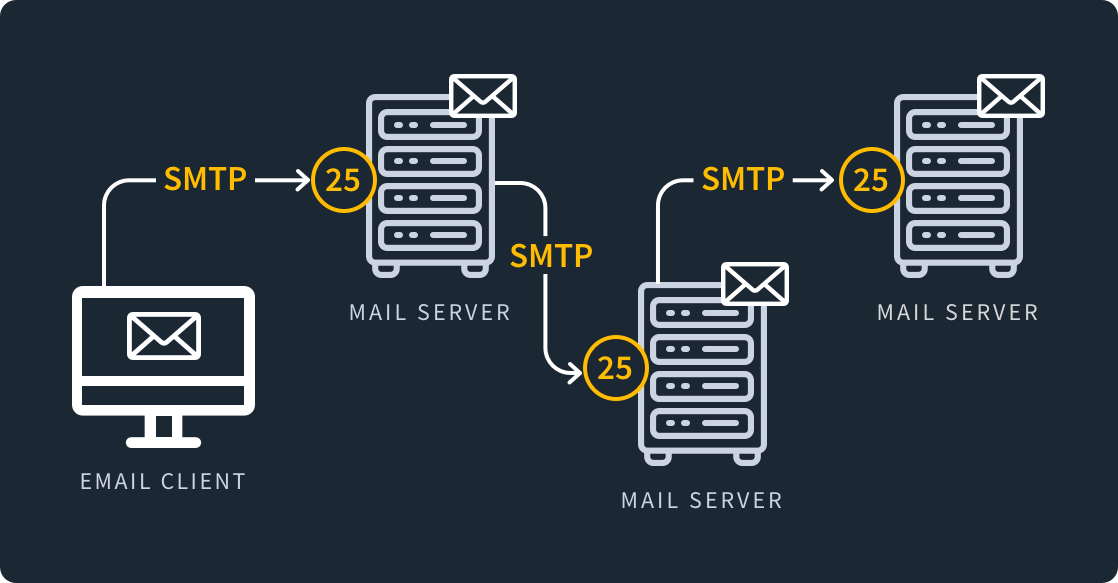
An SMTP port serves as a communication endpoint that facilitates the transfer of information between servers. When you send an email, the process involves multiple steps:
- Your email client (such as Apple Mail or Outlook) uploads the email to the outgoing mail server.
- The outgoing mail server then transfers the email to the recipient’s incoming mail server.
Think of SMTP as the postal service for emails, ensuring they reach their intended destinations. But what about ports?
The Port Analogy
Imagine an IP address as the physical street address of a business complex. Now, consider a port as the specific suite number within that complex. If you want to deliver something to a business, you can’t just address it to the entire complex—you need the right suite number.
Similarly, an IP address identifies a computer, while a port identifies a specific application or service running on that computer. For SMTP, the port ensures that the right email data reaches the correct place.
Common SMTP Ports
Let’s explore the most commonly used SMTP ports:
- Port 25 (SMTP): Historically, this was the default port for SMTP. However, due to security concerns and spam-related issues, many ISPs and email providers now block Port 25. It’s best to avoid using it unless you have specific reasons to do so.
- Port 587 (SMTPS): This is the recommended port for encrypted email transmissions. SMTPS encrypts, authenticates, and prevents data tampering. It’s commonly used for submission (uploading outgoing emails) and requires authentication.
- Port 465 (SMTPS Legacy): Although once popular, Port 465 is now deprecated. It was used for SMTP over SSL/TLS, but its use has declined due to security vulnerabilities.
- Port 2525: Some email services use Port 2525 as an alternative to Port 587. It’s less likely to be blocked by ISPs and provides a secure connection.
Choosing the Right SMTP Port
Consider the following factors when selecting an SMTP port:
- Security: For secure email transmission, opt for Port 587 (SMTPS). It ensures encryption and authentication.
- ISP Restrictions: Check if your ISP blocks any specific ports. If so, choose an alternative like Port 2525.
- Application Compatibility: Ensure your email client or server supports the chosen port.
- Troubleshooting: If you encounter issues, verify that your firewall or security software allows traffic on the selected port.
Troubleshooting Common SMTP Port Problems
- Blocked Ports: If emails aren’t sending, check if your ISP or hosting provider blocks certain ports. Adjust your SMTP settings accordingly.
- Authentication Errors: Ensure you’ve configured authentication correctly, especially when using Port 587.
- Firewall Rules: Review your firewall rules to allow traffic on the chosen port.
Remember, choosing the right SMTP port ensures smooth email delivery and enhances your overall email experience. So, next time you’re configuring your email client or server, make an informed choice based on your specific requirements.