
Cloudflare is widely used by website owners who want to improve performance, manage traffic and strengthen website security. One of its biggest advantages is that businesses can begin with a free plan and consider upgrading as their requirements grow.
However, choosing between Cloudflare Free and Cloudflare Pro is not always straightforward. A personal blog with limited traffic may have very different requirements from an online store, a professional services company or a website that generates customer enquiries every day.
The question is not simply whether Cloudflare Pro is better than Free. It is whether the additional features available with Pro are relevant to your website, your customers and the risks your business faces.
Understanding the differences can help you make an informed decision before spending money on website protection.
https://tremhost.com/cloudflare/
What Is Cloudflare Free?
Cloudflare Free provides website owners with access to important performance and security capabilities. These can include content delivery network services, DDoS protection, SSL/TLS support, DNS management and access to selected security controls.
By routing supported website traffic through Cloudflare’s network, website owners can benefit from caching, traffic handling and protection against certain types of malicious activity.
For a new website, personal blog or small project, these capabilities can provide a useful starting point. You can improve the delivery of website content and introduce an additional layer of protection without committing to a paid plan.
Free does not mean that the service is useless or insecure. In fact, many websites can operate successfully with Cloudflare Free when it is configured appropriately and supported by good hosting and application security practices.
The limitation is that the free plan does not include every feature available across Cloudflare’s paid plans.
What Does Cloudflare Pro Add?
Cloudflare Pro is designed for website owners who need additional capabilities beyond the free offering. Depending on current plan terms, these may include enhanced web application firewall features, more advanced security controls, image optimisation and additional performance tools.
These features can be valuable when a website plays a direct role in generating revenue, collecting enquiries or delivering services to customers.
For example, an online store may need stronger controls against common web application attacks. A business website may want additional options for managing suspicious requests, while a content-heavy website may benefit from available image optimisation features.
The key is to assess the actual features included in the current plan and determine whether they address a genuine requirement. A paid subscription should solve a problem or provide a useful capability, rather than simply look more impressive on a pricing page.
Cloudflare Pro vs Free: The Main Differences
Website security
Both plans provide security benefits, but the available controls and features differ.
Cloudflare Free offers a useful foundation for many websites. Pro adds access to additional security capabilities, including enhanced web application firewall features, subject to the current plan and configuration.
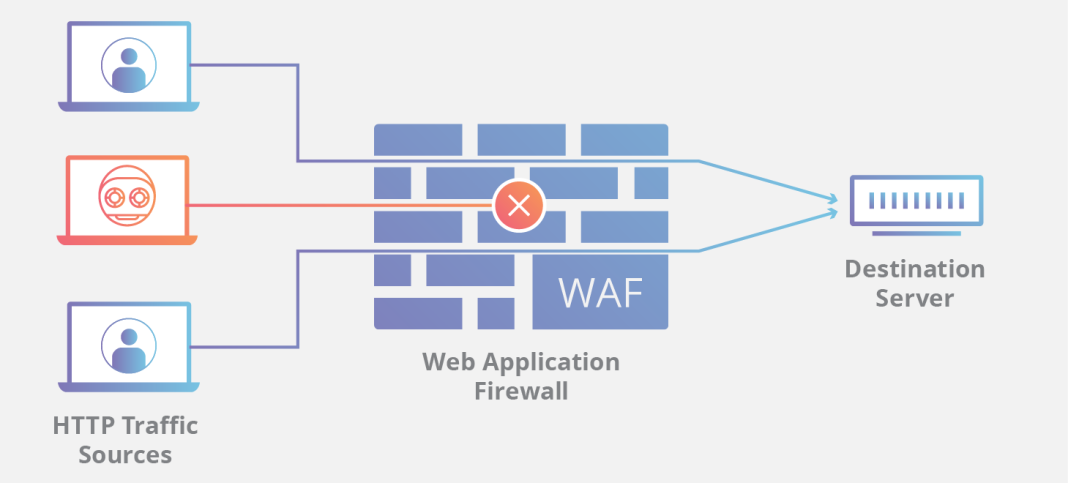
A WAF evaluates web requests against security rules to help identify and block certain malicious patterns. This can help reduce exposure to common web application attacks, although it does not eliminate every vulnerability.
If your website handles customer information, depends on online enquiries or runs a business-critical application, the additional controls available with Pro may be worth evaluating.
Performance optimisation
Both plans can improve website delivery through Cloudflare’s network. The exact performance benefits depend on the website, the content being delivered, caching behaviour and the origin server.
Pro provides access to additional optimisation features that may benefit eligible websites. Image-heavy sites, for instance, should assess whether the available image optimisation tools suit their content and traffic patterns.
Upgrading alone does not guarantee that a website will load faster. Poor hosting performance, oversized scripts, inefficient database queries and badly configured caching can still cause slowdowns.
Control and configuration
The available security and performance controls differ by plan. Before upgrading, review the current feature comparison and identify which capabilities matter for your website.
A business that only needs basic DNS management and caching may not require every Pro feature. Another business may find that additional firewall rules or optimisation options justify the cost.
The right choice depends on requirements, not assumptions.
Is Cloudflare Free Enough for a Business Website?
Sometimes, yes.
A simple company website that mainly provides contact details, service descriptions and basic information may operate comfortably with Cloudflare Free. If it receives modest traffic and does not require additional paid-plan features, upgrading may not be necessary.
However, the decision should not be based on website size alone. Even a small business website can be important if it generates sales leads, receives customer bookings or supports the company’s reputation.
Consider what would happen if the website were repeatedly targeted by malicious requests, if customers could not access it or if a vulnerable application component were exploited.
These questions help you evaluate the business impact of website security rather than treating the choice as a technical specification exercise.
When Should You Consider Cloudflare Pro?
Cloudflare Pro is worth considering when your website would benefit from features that are not available or are more limited under the free plan.
An online store may want additional web application security controls. A professional services company may want stronger protection for a website that generates valuable enquiries. A publisher may want to evaluate additional performance tools for its content.
A business should also consider the time and expertise required to configure and maintain its security settings. Buying a plan does not automatically mean every available feature is enabled or optimally configured.
Before upgrading, identify the problem you want to solve, confirm that Pro includes a relevant feature and test the configuration after making changes.
How Much Does Cloudflare Pro Cost?
Cloudflare’s direct pricing and plan terms can change, so always check the current official pricing before making a purchase decision.
Businesses can also explore provider-based options. Tremhost offers a Cloudflare Pro-based security option from $9 per month, giving eligible customers another route to consider.
You can review the service details at Tremhost Cloudflare.
When comparing prices, make sure you understand what each option includes. Confirm whether the service covers configuration, technical assistance, ongoing management or other services, and compare those terms with what you would receive by subscribing directly.
The lowest advertised price is useful only when the product and service match your requirements.
Does Cloudflare Pro Replace Website Hosting Security?
No. Cloudflare and your hosting environment perform different roles.
Cloudflare can filter and manage traffic passing through its network, but your hosting account and application still need appropriate security controls. Outdated software, weak passwords, compromised administrator accounts and exposed origin services can create risks that a WAF alone cannot resolve.
For WordPress websites, maintain core software, themes and plugins. Use strong authentication, keep dependable backups and restrict access to administrative tools. Where practical, configure the origin server so that visitors cannot simply bypass Cloudflare and connect directly to it.
A layered security approach helps ensure that your website is not relying on one product to address every possible threat.
How to Choose the Right Cloudflare Plan
Start with the website’s purpose. If it is a personal project or a basic informational website, Free may provide everything you currently need.
If the website is important to your business, examine the additional features in Pro and decide whether they address meaningful security or performance requirements. Review the current official plan documentation rather than relying on outdated comparisons.
Finally, consider who will configure the service and investigate issues when something goes wrong. A security product is most useful when it is implemented correctly and supported by sound website maintenance practices.
Businesses seeking a broader security approach can also explore Tremhost’s managed cybersecurity services.
Final Verdict: Cloudflare Pro or Free?
Cloudflare Free is a strong starting point for many websites. It offers useful security and performance capabilities without a paid subscription.
Cloudflare Pro is worth considering when its additional features address specific needs, particularly for websites that play an important role in customer acquisition, online sales or business operations.
The best plan is the one that fits your requirements, not necessarily the most expensive one.
If you are comparing Cloudflare Pro options for your business, review the current features, understand what the service includes and choose a configuration that supports your website’s security and performance goals.
Explore your options with Tremhost: https://tremhost.com/cloudflare/