
A website can look perfectly normal to its visitors while receiving requests designed to exploit vulnerabilities, access sensitive information or disrupt its operation. These threats are not always obvious. Some attacks arrive through automated bots, while others target weaknesses in the applications and software that power a website.
This is where a web application firewall becomes important.
Cloudflare Pro includes web application firewall capabilities designed to help protect websites against common web-based threats. For businesses that depend on their websites to attract customers, process enquiries or provide online services, understanding how this protection works can help them make better security decisions.
But what exactly does the Cloudflare Pro WAF do? How does it work, and is it enough to secure an entire website?
https://tremhost.com/cloudflare/
What Is a Web Application Firewall?
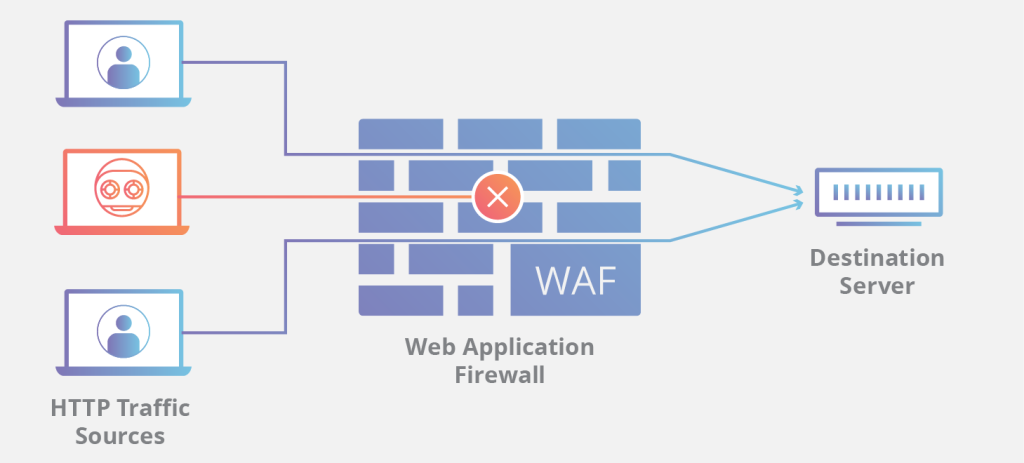
A web application firewall, commonly known as a WAF, examines HTTP and HTTPS requests travelling to a website and applies security rules to identify potentially malicious traffic.
Think of it as a security checkpoint between visitors and your website. Legitimate requests should reach the website, while requests matching configured security rules can be blocked, challenged or otherwise handled according to the firewall’s settings.
A traditional network firewall and a web application firewall do not perform exactly the same job. A network firewall focuses on network traffic and connections, while a WAF concentrates on requests made to web applications.
That distinction matters because many website attacks use the same protocols as ordinary visitors. A malicious request can arrive over HTTPS and still attempt to exploit an application vulnerability. Encryption protects data in transit, but it does not automatically make every request trustworthy.
How Cloudflare Pro WAF Helps Protect Websites
Cloudflare operates as a reverse proxy for websites using its proxied DNS records. When configured correctly, requests pass through Cloudflare’s network before reaching the origin server.
This positioning allows Cloudflare to apply security controls to web traffic before it reaches the website’s hosting environment.
Cloudflare Pro provides access to additional application security features, including its web application firewall capabilities. Depending on the applicable plan, configuration and available rulesets, these controls can help identify and block requests associated with common attack patterns.
For example, a malicious request might attempt to manipulate a database query, exploit a vulnerable application endpoint or submit suspicious input to a web form. Relevant firewall rules can inspect request characteristics and take action when a request matches a rule.
The important point is that a WAF helps reduce exposure to common web threats. It is not a guarantee that every attack will be detected or that every vulnerability will be prevented from being exploited.
What Types of Attacks Can a WAF Help Address?
SQL injection attempts
SQL injection occurs when an attacker attempts to manipulate a database query through application input. If an application handles that input incorrectly, the attacker may be able to access or manipulate data.
WAF rules can detect patterns associated with common SQL injection attempts and block matching requests. However, application developers must still use parameterised queries, validate input appropriately and follow secure coding practices.
Cross-site scripting attempts
Cross-site scripting, often abbreviated as XSS, involves injecting malicious scripts into content that is later processed by a victim’s browser.
Depending on the attack and applicable rules, a WAF can help detect suspicious requests associated with common XSS patterns. It should complement, rather than replace, output encoding, input handling and other application-level security controls.
Suspicious automated traffic
Not every bot is malicious. Search engine crawlers, monitoring services and other automated tools can serve legitimate purposes. However, some automated traffic is designed to probe websites, submit spam or repeatedly target application endpoints.
Firewall rules and related traffic controls can help businesses manage suspicious requests. The correct approach depends on the traffic pattern, the website’s requirements and the security features available under the selected plan.
Attempts to exploit known vulnerabilities
Attackers frequently scan websites for weaknesses in content management systems, plugins and other application components. WAF rules can help block requests associated with recognised attack techniques.
Nevertheless, a firewall cannot reliably compensate for every outdated plugin, compromised administrator account or unknown vulnerability. Software updates and secure access controls remain essential.
Why Cloudflare Pro WAF Configuration Matters
Activating a security product is only one part of protecting a website. The rules that are enabled, the way traffic is routed and the handling of legitimate requests all influence the final result.
A poorly configured firewall may block genuine customers, interfere with application functionality or leave important security gaps.
Businesses should review the security rules available to their plan, understand what actions those rules take and monitor the resulting security events. When a legitimate request is blocked, the appropriate response is to investigate the rule and request rather than disabling protection indiscriminately.
For websites that depend on online payments, customer portals, booking systems or enquiry forms, testing critical functions after security changes is particularly important.
Cloudflare’s security controls should be configured around the website’s actual needs, not simply enabled without review.
Is Cloudflare Pro WAF Enough to Secure a Website?
Cloudflare Pro can strengthen a website’s security, but no single service eliminates every risk.
A WAF primarily evaluates web requests passing through the configured Cloudflare proxy. It does not automatically fix vulnerable website code, remove malware already installed on a server, prevent every account takeover or secure every service running on the origin server.
The hosting environment matters, too. If an attacker can connect directly to an origin server and bypass Cloudflare, some of the protection offered by the proxy may be undermined. Origin access should therefore be reviewed and restricted where practical.
A complete security approach should combine Cloudflare’s edge protection with regular software updates, strong administrator authentication, reliable backups, appropriate server security and a recovery plan.
For WordPress websites, for example, keeping themes and plugins updated is just as important as managing traffic at the network edge.
Cloudflare Pro Directly or Through a Provider?
Businesses can evaluate Cloudflare plans directly or explore service providers that offer a Cloudflare Pro-based service with additional setup and support.
The right option depends on what the business needs. Some organisations are comfortable managing DNS, security settings and troubleshooting themselves. Others prefer assistance with configuration and ongoing technical issues.
Tremhost offers a Cloudflare Pro-based security option from $9 per month. Businesses can review the service and its applicable features on the Tremhost Cloudflare page.
Before choosing any provider, confirm exactly what is included, how the service is provisioned, who manages the configuration and what support is available. A provider’s price should be assessed alongside the actual service delivered, not treated as a substitute for understanding the plan.
Businesses looking for broader assistance can also explore Tremhost’s managed cybersecurity services.
How to Get More Value From Cloudflare Pro WAF
Start by confirming that the website’s DNS records are configured correctly and that the relevant records are proxied through Cloudflare. Review the security features available under your plan and understand which rulesets and controls are active.
Next, inspect security events to identify blocked requests and recurring patterns. Test important website functions, including forms, login pages and customer-facing applications, after making changes. Finally, make sure the origin server is not unnecessarily exposed and that the website’s software and administrator accounts are maintained securely.
These steps help turn a security subscription into a more deliberate protection strategy.
Final Thoughts
Cloudflare Pro WAF is a useful layer of defence for businesses that want to reduce exposure to common web application attacks. Its value comes from inspecting requests at the edge and applying security rules before suspicious traffic reaches the origin server.
However, effective website security requires more than a firewall. Correct configuration, secure application code, patched software, protected origin infrastructure and dependable backups all contribute to a stronger defence.
If you are considering Cloudflare Pro for your business website, explore the features available to your plan, understand the limitations and choose a setup that fits your actual security requirements.
Explore Cloudflare security through Tremhost: https://tremhost.com/cloudflare/


