
“DDoS protection included” is one of those phrases that shows up on nearly every VPS and dedicated hosting pricing page, usually as a single reassuring bullet point sitting alongside storage and bandwidth numbers. Almost nobody actually explains what it covers, how it works, or, just as importantly, what it genuinely can’t do. Given that DDoS attacks are one of the more common and disruptive things that can happen to a server, it’s worth actually understanding what you’re getting before assuming a single bullet point means your server is fully protected against anything that might come its way.
What a DDoS Attack Actually Is
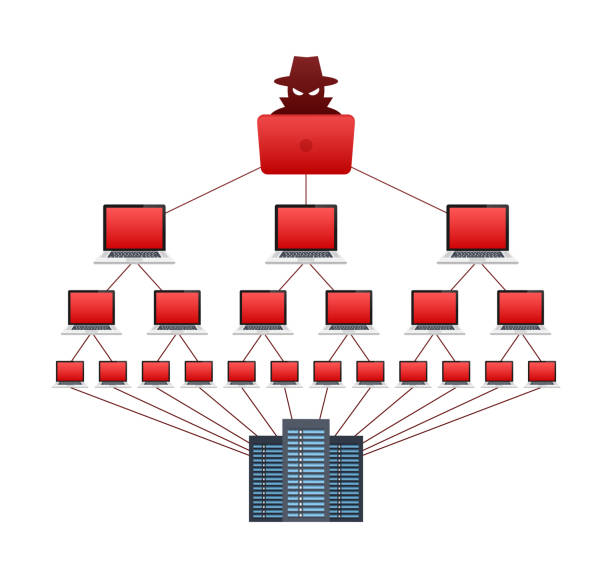
DDoS stands for distributed denial-of-service, and the name describes exactly what it does. An attacker directs a flood of traffic at your server from many different sources simultaneously, often thousands or even millions of compromised devices working together, called a botnet, with the goal of overwhelming your server’s capacity to respond. Your server, faced with far more requests than it can realistically process, either slows to a crawl for legitimate visitors or stops responding entirely, effectively taking your website or application offline for anyone trying to reach it.
The “distributed” part matters specifically because it’s what makes these attacks hard to simply block at the front door. A single attacker sending excessive traffic from one location is relatively straightforward to identify and block. A distributed attack spreads that traffic across thousands of different sources, often devices whose real owners have no idea they’re involved, making it far harder to distinguish malicious traffic from genuine visitors using simple, static blocking rules.
What Provider-Level DDoS Protection Actually Does
When a hosting provider advertises DDoS protection, they’re typically referring to network-level mitigation that sits in front of your server, monitoring incoming traffic patterns and filtering out malicious requests before they ever reach your actual server resources. This generally works by establishing a baseline of what normal traffic to your server looks like, and then automatically detecting and filtering traffic that deviates from that pattern in ways consistent with an attack, sudden massive spikes in connection attempts, traffic originating from patterns associated with known botnets, or requests that don’t behave the way genuine browser traffic typically does.
This kind of protection genuinely matters and does real, measurable work, because without it, your server would have to absorb the full force of an attack directly, using up its own limited CPU and bandwidth just trying to process the flood of malicious requests, which is exactly what takes a server offline. Provider-level mitigation handles the bulk of this filtering upstream, before it ever becomes your server’s problem, which is a meaningful layer of defence that would be genuinely difficult and expensive to replicate on your own.
Where the Coverage Typically Stops
This is the part that rarely gets mentioned alongside the reassuring bullet point, and it’s worth understanding clearly. Standard DDoS protection included with most VPS and hosting plans is generally built to handle common, automated, high-volume attacks, the kind launched by widely available attack tools against a broad range of targets rather than a specifically determined attacker targeting your server in particular. It’s genuinely effective against this category of attack, which represents the large majority of what most websites will ever actually encounter.
What it’s typically not built to fully withstand is a sophisticated, sustained, large-scale attack specifically targeting your infrastructure, the kind large enterprises occasionally face, which can require specialised, significantly more expensive mitigation services operating at a completely different scale. It’s also worth knowing that standard DDoS protection generally defends against network and infrastructure-level attacks, flooding your server with traffic, but doesn’t defend against application-level vulnerabilities, a poorly secured login page, an unpatched piece of software, a SQL injection vulnerability in your own code, which are different categories of threat requiring different kinds of protection entirely, like a web application firewall rather than DDoS mitigation specifically.
Why This Distinction Actually Matters to You
Understanding this gap matters because it shapes what you should and shouldn’t assume is covered. If your business has previously been the specific target of a sustained, sophisticated attack, rather than just general automated traffic, it’s worth having a direct conversation with your provider about what their standard protection actually covers at that scale, rather than assuming the bullet point on the pricing page means unlimited protection against anything, including attacks well beyond what a typical small or medium-sized website would ever face. For the overwhelming majority of websites and applications, though, standard provider-level DDoS protection genuinely does cover the realistic threat landscape, automated, opportunistic attacks rather than a determined, well-resourced attacker specifically targeting your infrastructure, which is a scenario most websites, honestly, will never actually encounter.
It’s also worth remembering that DDoS protection is only one layer of a genuinely secure server setup, not the whole picture. A server with solid DDoS mitigation but an outdated, unpatched software stack is still vulnerable, just to a different category of attack entirely. This is why DDoS protection tends to be bundled alongside other security measures on a well-built managed hosting plan rather than offered as a single standalone feature.
What to Actually Look For
When evaluating DDoS protection on a hosting plan, it’s worth checking whether it’s genuinely built into the network infrastructure itself, filtering traffic before it reaches your server, rather than a software-based solution running on the server itself, which can still be overwhelmed by sufficiently large traffic volume since it’s competing for the same limited resources it’s meant to be protecting. It’s also worth checking whether protection is active by default or something you need to separately configure or request, since a protection feature that exists but isn’t actually switched on for your account provides no real benefit at all. Tremhost’s VPS and Managed VPS plans include network-level DDoS protection as standard across every tier, active by default rather than as an opt-in add-on, specifically so the baseline, most common category of attack is handled automatically without requiring you to configure anything yourself, alongside the firewall and malware monitoring that cover the application-level threats DDoS protection alone was never designed to catch.