




When selecting a web hosting solution, understanding the differences between shared, VPS, dedicated, and cloud hosting is crucial. Each type has its pros and cons. Here’s a breakdown to help you choose the right option for your needs.
1. Shared Hosting
Overview
- Definition: Multiple websites share a single server and its resources.
- Best For: Small websites, blogs, and personal projects.
Pros
- Cost-Effective: Typically the cheapest option available.
- Easy to Use: User-friendly with managed services, perfect for beginners.
- Maintenance: Server maintenance is handled by the hosting provider.
Cons
- Limited Resources: Performance can be affected by other websites on the same server.
- Less Control: Limited customization options and server settings.
- Security Risks: Higher risk since multiple sites share the same environment.
2. VPS Hosting (Virtual Private Server)
Overview
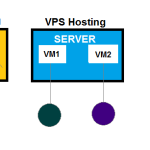
- Definition: A single physical server is divided into multiple virtual servers, providing dedicated resources to each.
- Best For: Small to medium-sized businesses with growing traffic.
Pros
- Dedicated Resources: More control and dedicated resources compared to shared hosting.
- Customization: Greater flexibility for configuring the server environment.
- Improved Performance: Better performance and speed due to fewer users on the server.
Cons
- Higher Cost: More expensive than shared hosting but cheaper than dedicated.
- Management Required: Some technical knowledge is necessary for server management.
- Limited Scalability: While more scalable than shared, it may not handle very high traffic spikes as well as cloud hosting.
3. Dedicated Hosting
Overview
- Definition: An entire physical server is dedicated to a single client, providing maximum control and resources.
- Best For: Large businesses and high-traffic websites.
Pros
- Full Control: Complete control over server settings and configurations.
- High Performance: Optimal performance with dedicated resources.
- Enhanced Security: Better security since no other websites share the server.
Cons
- High Cost: The most expensive option available.
- Management Complexity: Requires technical expertise to manage and maintain the server.
- Resource Inefficiency: May lead to underutilization if traffic fluctuates.
4. Cloud Hosting
Overview
- Definition: Websites are hosted on a network of interconnected servers, allowing resources to be spread across multiple machines.
- Best For: Websites with fluctuating traffic and those needing scalability.
Pros
- Scalability: Easily scale resources up or down based on demand.
- Reliability: Built-in redundancy; if one server fails, others can take over, minimizing downtime.
- Cost-Effective: Pay for what you use, making it economical for varying traffic levels.
Cons
- Variable Costs: Costs can fluctuate based on usage, which may be unpredictable.
- Complexity: May require more technical knowledge to manage than shared or VPS hosting.
- Less Control: Limited control over the underlying infrastructure compared to dedicated hosting.
Conclusion
Choosing the right hosting type depends on your website’s needs, budget, and technical expertise.
- Shared Hosting is great for beginners and small sites.
- VPS Hosting is suitable for growing businesses needing more resources.
- Dedicated Hosting is ideal for large, high-traffic websites requiring maximum performance.
- Cloud Hosting offers scalability and reliability, perfect for websites with fluctuating traffic.
Assess your requirements carefully to select the best hosting solution for your specific situation.


