Home Blog Page 595

What Is Webmail?

0

Webmail, short for web-based email, is an online email service that allows users to access and manage their email accounts through a web browser. It offers a convenient and accessible way to send, receive, organize, and store emails without the need for a dedicated email client software. In this essay, we will delve into the features, benefits, and functionalities of webmail, highlighting its significance in modern communication.

Overview of Webmail:
Webmail provides users with an interface to interact with their email accounts using a web browser. It eliminates the requirement for installing and configuring email client software on individual devices, making it accessible from any computer or mobile device with an internet connection. Webmail is typically offered as part of email hosting services or integrated into web hosting control panels like cPanel.

Features and Functionalities of Webmail:

Email Management:
Webmail offers essential email management features such as composing and sending emails, replying, forwarding, and deleting messages. Users can create folders to organize their emails, mark messages as read/unread, and search for specific emails using various criteria.

Address Book and Contacts:
Webmail provides an address book or contact management feature, allowing users to store and manage their contacts. Users can create and edit contacts, group them into categories, and import/export contacts from other sources. This feature simplifies the process of addressing emails and facilitates efficient communication.

Attachments and File Management:
Webmail enables users to attach files to their emails, allowing them to send documents, images, or other media easily. Users can also manage their attachments by viewing, downloading, or deleting them from their email storage space.

Folder Organization:
Webmail allows users to create and manage folders to organize their emails. This feature helps users categorize their messages, making it easier to locate and retrieve specific emails later. Common folder names include Inbox, Sent, Drafts, Spam, and Archive.

Spam Filtering:
Webmail often incorporates robust spam filtering mechanisms to automatically detect and filter out unsolicited or junk emails. It helps minimize the clutter in the inbox and enhances the overall email experience by reducing the chances of encountering spam or phishing attempts.

Search Capabilities:
Webmail provides search functionality to quickly locate specific emails within the mailbox. Users can search by sender, recipient, subject, or keywords to find relevant messages efficiently.

Multiple Account Support:
Webmail often supports the management of multiple email accounts from different email providers within a single interface. This feature allows users to consolidate their email accounts, saving time and effort by accessing and managing all their emails from one location.

Mobile Accessibility:
Webmail is designed to be responsive and mobile-friendly. It can be accessed from smartphones and tablets, allowing users to manage their emails on the go. Some webmail providers also offer dedicated mobile apps for enhanced convenience and a seamless mobile email experience.

Benefits of Webmail:

Accessibility and Convenience:
Webmail offers the advantage of accessing emails from any device with an internet connection and a web browser. This flexibility allows users to check and manage their emails conveniently, regardless of their location or the device they are using.

No Software Installation:
Webmail eliminates the need to install and configure email client software on individual devices. This not only saves storage space but also simplifies the setup process and reduces compatibility issues that may arise from using different operating systems or devices.

Cross-Platform Compatibility:
Webmail is compatible with various operating systems, including Windows, macOS, Linux, and mobile platforms such as Android and iOS. It ensures a consistent email experience across different devices and operating environments.

Automatic Synchronization:
Webmail often incorporates synchronization features, ensuring that changes made on one device are reflected across all devices. For example, if an email is read or deleted on a smartphone, the same status will be updated on other devices accessing the same email account.

Disaster Recovery and Data Security:
Webmail services typically provide data backup and protection measures to safeguard user emails. This helps protect against data loss due to device failures, malware attacks, or accidental deletions. Additionally, webmail providers often implement robust security protocols, encryption, and authentication mechanisms to ensure the privacy and security of user emails.

Scalability and Flexibility:
Webmail services can easily scale to accommodate growing email storage needs. Users can typically upgrade their email storage capacity as per their requirements, ensuring they have sufficient space to store their emails and attachments.

Webmail has revolutionized the way we access and manage our emails. By providing a browser-based interface with robust features and functionalities, webmail offers users a convenient and accessible platform to handle their email communication. Its compatibility, convenience, and synchronization capabilities make it a popular choice for individuals, businesses, and organizations seeking an efficient and flexible email management solution. With its constant evolution and integration with other online services, webmail continues to play a vital role in modern communication.
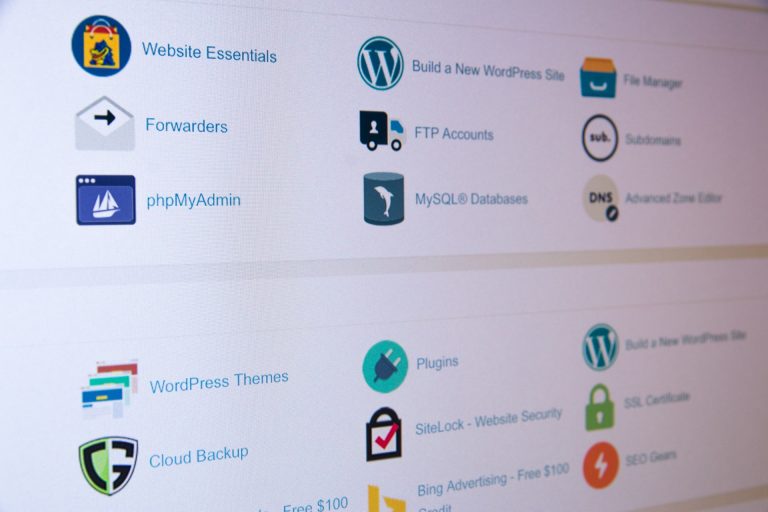

What are some common tools and features available in cPanel?

0

cPanel provides a wide range of tools and features to help users manage their web hosting accounts efficiently. Here are some common tools and features you can find in cPanel:

File Manager: A file management tool that allows you to upload, download, edit, and organize files and directories on your website server. It provides a user-friendly interface similar to a desktop file explorer.

Email Accounts: cPanel enables you to create and manage email accounts associated with your domain. You can set up email forwarding, autoresponders, spam filters, and access webmail interfaces to manage your emails.

Domains: This section allows you to manage your domains, including adding and managing subdomains, setting up domain redirects, managing DNS (Domain Name System) settings, and configuring domain aliases.

Databases: cPanel provides tools for creating and managing databases, primarily using the MySQL or MariaDB database systems. You can create databases, set up users and permissions, manage database backups, and access phpMyAdmin for advanced database administration tasks.

File Backup: cPanel offers backup and restoration tools for your website files, databases, and email accounts. You can schedule backups, generate full or partial backups, and restore them when needed.

SSL/TLS Manager: This tool allows you to manage SSL certificates for secure connections to your website. You can generate and install SSL certificates, set up HTTPS redirection, and manage certificate signing requests (CSRs).

Security: cPanel provides various security features, such as password-protected directories, IP blocking, and SSL/TLS settings. You can configure firewalls, manage SSH (Secure Shell) access, and view access logs to monitor and enhance the security of your hosting account.

Metrics and Analytics: cPanel offers built-in tools to monitor website statistics and analytics. You can access metrics such as website traffic, bandwidth usage, error logs, and resource usage. These insights help you track the performance of your website and make informed decisions.

Softaculous: This tool allows you to install a wide range of applications and scripts on your website with just a few clicks. It includes popular content management systems (CMS) like WordPress, Joomla, and Drupal, as well as e-commerce platforms, forums, and more.

Cron Jobs: Cron Jobs enable you to schedule and automate tasks on your server. You can set up scripts or commands to run at specific intervals, such as backups, database maintenance, or script execution.

DNS Zone Editor: This tool allows you to manage DNS settings for your domains. You can add or modify DNS records, set up email routing, create subdomains, and manage other DNS-related configurations.

These are just a few examples of the tools and features available in cPanel. The specific tools and their arrangement may vary slightly depending on the version of cPanel and your web hosting provider. Additionally, cPanel often provides integration with third-party applications and services, allowing you to extend its functionality and integrate with popular tools in the web development ecosystem.

How to access cPanel on your web hosting account?

0

To access cPanel on your web hosting account, follow these general steps:

Open your preferred web browser.

In the address bar, enter the URL provided by your web hosting provider, typically in the format: https://yourdomain.com/cpanel or https://youripaddress/cpanel. Alternatively, you can try https://cpanel.yourdomain.com.

Press Enter to load the cPanel login page.

Enter your cPanel username and password. These credentials are usually provided to you by your web hosting provider when you sign up for a hosting account. If you don’t have the login details, reach out to your hosting provider’s support team for assistance.

After entering your username and password, click on the “Log in” or “Sign in” button.

If the provided credentials are correct, you will be redirected to the cPanel dashboard.

Note: In some cases, the cPanel login page may be accessed through a different URL or a specific login portal provided by your hosting provider. If you’re unsure about the correct URL or encountering any issues, it’s recommended to consult your hosting provider’s documentation or contact their support team for specific instructions.

Once you have successfully logged in to cPanel, you will have access to the various tools and features it offers, allowing you to manage your website, domains, email accounts, databases, security settings, and more. The exact layout and organization of cPanel may vary slightly depending on your hosting provider and the version of cPanel they are using, but the core functionality remains consistent across most installations.

Remember to keep your cPanel login credentials secure and avoid sharing them with unauthorized individuals to maintain the security of your hosting account.

What Is Cpanel?

0

cPanel is a widely used and highly regarded web hosting control panel that simplifies the management and administration of websites and server resources. It provides an intuitive graphical user interface (GUI) that allows website owners, administrators, and developers to efficiently manage various aspects of their hosting environment. In this essay, we will explore the features, benefits, and functions of cPanel, shedding light on its significance in the web hosting industry.

What is cPanel?
cPanel is a comprehensive web-based control panel developed by cPanel, LLC. It offers a user-friendly interface and a suite of tools that enable users to manage their websites, domains, email accounts, databases, file systems, security settings, and more. It is typically provided by web hosting companies as part of their hosting packages, allowing users to easily manage their websites without requiring extensive technical knowledge.

Features and Functions of cPanel:

Website Management:
cPanel provides a range of tools for managing website files, directories, and domains. Users can upload and manage files through the File Manager, create and manage subdomains, set up redirects, and configure domain settings. It also offers tools for managing FTP accounts, managing SSL certificates, and installing applications through the Softaculous script installer.

Email Management:
cPanel enables users to create and manage email accounts associated with their domains. Users can set up email forwarding, autoresponders, spam filters, and email authentication. Additionally, cPanel provides access to webmail interfaces, allowing users to access their emails through a web browser.

Database Management:
cPanel offers tools for managing databases, primarily through the popular MySQL database system. Users can create and manage databases, set up users and user permissions, and utilize phpMyAdmin for database administration tasks. This functionality is crucial for applications and websites that rely on database-driven content.

DNS Management:
cPanel allows users to manage their domain’s DNS (Domain Name System) settings. Users can create and manage DNS zones, add or modify DNS records, set up email routing, and configure domain aliases.

Security and Backups:
cPanel provides various security features to protect websites and server resources. Users can set up password-protected directories, manage SSL/TLS certificates, configure firewalls, and access logs. It also offers backup and restoration tools, allowing users to schedule and perform backups of their website files, databases, and email accounts.

Metrics and Analytics:
cPanel provides built-in tools for monitoring website statistics and analytics. Users can access metrics such as website traffic, bandwidth usage, visitor information, error logs, and resource usage. These insights help users track the performance of their websites and make informed decisions to optimize their online presence.

Benefits of cPanel:

User-Friendly Interface:
The intuitive GUI of cPanel makes it accessible to users with varying levels of technical expertise. Its straightforward navigation and organized layout simplify the management of complex hosting tasks, reducing the learning curve associated with server administration.

Time and Resource Efficiency:
cPanel streamlines numerous administrative tasks, saving users time and effort. Performing routine operations such as setting up email accounts, managing databases, and configuring domains becomes quick and hassle-free, allowing users to focus on other aspects of their websites or businesses.

Wide Compatibility:
cPanel is compatible with various operating systems, including Linux and Windows. It supports popular web servers like Apache and Nginx, making it versatile and adaptable to different hosting environments.

Third-Party Integrations:
cPanel integrates seamlessly with numerous third-party applications and services. It offers plugins and APIs that allow users to extend its functionality and integrate with other tools such as content management systems (CMS), e-commerce platforms, and analytics services.

Support and Community:

cPanel benefits from a large and active user community. This community provides support, resources, tutorials, and forums where users can seek assistance, share knowledge, and stay updated on the latest developments in cPanel and web hosting.

cPanel serves as a powerful and user-friendly web hosting control panel, empowering website owners, administrators, and developers to manage and control their hosting environments effectively. With its comprehensive set of features, intuitive interface, and compatibility with various systems, cPanel has become a standard in the web hosting industry. By simplifying complex tasks, enhancing security, and providing valuable insights, cPanel contributes significantly to the efficiency and success of websites and online businesses.

How to enable two-factor authentication for your Outlook account?

0

Enabling two-factor authentication (2FA) for your Outlook account adds an extra layer of security by requiring a second verification step in addition to your password. Here’s a step-by-step guide on how to enable 2FA for your Outlook account:

Step 1: Accessing Your Outlook Account Settings:

Open your preferred web browser and go to the Outlook sign-in page (www.outlook.com).

Enter your email address or username associated with your Outlook account.

Click on the “Next” button and enter your current password to access your account.

Once logged in, click on your profile picture or initials located at the top-right corner of the screen.

From the dropdown menu, select “View account” or “My Account” to access your account settings.

Step 2: Enabling Two-Factor Authentication:

Now that you are in your account settings, follow these steps to enable two-factor authentication:

Look for the “Security” or “Privacy & Security” section within your account settings. The exact location may vary based on the Outlook version or interface.

Within the security settings, locate the option to enable two-factor authentication. It might be labeled as “Two-Step Verification,” “Two-Factor Authentication,” or similar.

Click on the option to enable two-factor authentication, and you will be presented with the setup process.

Outlook may require you to enter your current password once again for verification.

Next, you will need to choose the second factor for authentication. Outlook offers various options, including:

a. Text message (SMS) verification: You can receive a verification code via text message to your registered phone number.

b. Authenticator app: You can use an authenticator app, such as Microsoft Authenticator, Google Authenticator, or Authy, to generate verification codes.

c. Email verification: You can receive a verification code via email to your registered email address.

d. Phone call verification: You can receive a verification code through an automated phone call to your registered phone number.

Select the preferred method for receiving verification codes and follow the on-screen instructions to complete the setup process. This may involve entering a phone number, installing an authenticator app, or verifying your email address.

Once you have successfully set up two-factor authentication, Outlook will provide you with backup codes. These codes can be used to access your account if you don’t have access to your second factor (e.g., lost phone). Store these backup codes in a secure location.

After enabling two-factor authentication, Outlook may prompt you to re-enter your password and complete the verification process to ensure the changes are applied.

Step 3: Using Two-Factor Authentication:

After enabling two-factor authentication, each time you sign in to your Outlook account, you will be prompted to provide the second factor for authentication. The specific method you chose during the setup process (text message, authenticator app, email, or phone call) will determine how you receive the verification code.

Follow the instructions provided during the sign-in process to enter the verification code and complete the login.

Conclusion:

Enabling two-factor authentication for your Outlook account significantly enhances its security by adding an extra layer of protection. By following the steps outlined in this guide, you can enable two-factor authentication and enjoy the peace of mind that comes with knowing your Outlook account is better safeguarded against unauthorized access. Remember to keep your second factor (e.g., phone, authenticator app) secure and readily accessible to ensure a seamless login experience.

Mastering Password Management: A Guide to Changing Your Outlook Password

0

In today’s digital age, password security is of utmost importance to protect our sensitive information and online accounts. One crucial aspect of maintaining strong security is regularly changing passwords. In this guide, we will focus on changing your Outlook password, offering step-by-step instructions and best practices to ensure a smooth and secure transition. By mastering password management, you can enhance your online security and safeguard your personal and professional data.

Step 1: Assessing the Need for a Password Change:

Before diving into the process of changing your Outlook password, it is essential to evaluate the need for a change. Consider the following factors:

Password Age: If your current password has been in use for an extended period, it is advisable to change it to maintain optimal security.

Security Breaches: If you suspect or have received notifications of a security breach affecting your Outlook account or the platform itself, changing your password is crucial to protect your information.

Suspicious Activity: If you notice any unusual activity, such as unrecognized login attempts or unauthorized access, changing your password is essential to prevent further compromise.

Step 2: Accessing the Outlook Account Settings:

To change your Outlook password, follow these steps:

Open your preferred web browser and go to the Outlook sign-in page (www.outlook.com).

Enter your email address or username associated with your Outlook account.

Click on the “Next” button and enter your current password to access your account.

Once logged in, click on your profile picture or initials located at the top-right corner of the screen.

From the dropdown menu, select “View account” or “My Account” to access your account settings.

Step 3: Changing Your Outlook Password:

Now that you are in your account settings, follow these steps to change your Outlook password:

Look for the “Security” or “Privacy & Security” section within your account settings. The exact location may vary based on the Outlook version or interface.

Within the security settings, locate the option to change your password. It might be labeled as “Change password,” “Password settings,” or similar.

Click on the password change option, and you will be prompted to enter your current password once again for verification.

After confirming your current password, enter your new password in the designated fields. Aim for a strong, unique password that combines uppercase and lowercase letters, numbers, and symbols. Avoid using easily guessable information or common phrases.

Some platforms may require you to re-enter your new password to ensure accuracy. If prompted, do so accordingly.

Once you have entered and confirmed your new password, click on the “Save” or “Update” button to finalize the password change.

Step 4: Strengthening Password Security:

Changing your Outlook password is an excellent opportunity to reinforce your overall password security. Consider the following best practices:

Unique Passwords: Do not reuse passwords across multiple accounts. Instead, create a unique password for each online service to mitigate the risk of a single breach compromising multiple accounts.

Complex and Lengthy: Craft passwords that are complex, consisting of a combination of letters, numbers, and symbols. Aim for a minimum of 12 characters to enhance security.

Two-Factor Authentication (2FA): Enable 2FA whenever possible. This adds an extra layer of security by requiring a second verification step, such as a unique code sent to your mobile device, in addition to your password.

Password Managers: Consider using a reputable password manager to securely store and generate strong passwords. Password managers can simplify the process of managing multiple complex passwords.

Regular Updates: Commit to periodically changing your passwords, ideally every three to six months, to maintain robust security.

Conclusion:

Mastering password management is crucial for maintaining a secure online presence. By following the steps outlined in this guide, you can confidently change your Outlook password, ensuring the protection of your personal and professional data. Remember to regularly assess the need for password changes, strengthen your password security, and stay vigilant against potential threats. By prioritizing password security, you take an essential step towards safeguarding your digital identity and maintaining peace of mind in an increasingly interconnected world.

What Is GoDaddy?

0

GoDaddy is a well-known and widely used technology company that specializes in domain registration, web hosting, and online services. It has become a household name in the world of internet infrastructure and has played a significant role in shaping the online landscape. In this essay, we will explore the various aspects of GoDaddy, including its history, services, and its impact on the digital world.

GoDaddy was founded in 1997 by Bob Parsons, an entrepreneur with a vision to make domain registration and web hosting accessible to everyone. Since its inception, the company has grown exponentially and has become one of the world’s largest domain registrar, managing millions of domain names. GoDaddy’s headquarters is located in Scottsdale, Arizona, but it operates globally, serving customers from all corners of the world.

The primary service provided by GoDaddy is domain registration, and a domain name is the unique address that identifies a website on the internet, such as www.example.com. GoDaddy offers a user-friendly platform where individuals and businesses can search for available domain names and register them. This service has been instrumental in enabling individuals and organizations to establish their online presence and showcase their products, services, or ideas to a global audience.

In addition to domain registration, GoDaddy offers web hosting services. Web hosting is the process of storing website files on a server and making them accessible to internet users. GoDaddy provides reliable and secure web hosting solutions that cater to a wide range of needs, from personal blogs to large e-commerce websites. Their hosting plans offer features such as scalable storage, bandwidth, email accounts, and easy-to-use website builders, empowering users to create and manage their online platforms effectively.

Let’s get to explore how GoDaddy’s web hosting solutions stand out:

Variety of Hosting Plans: GoDaddy offers a wide range of hosting plans tailored to different needs, ranging from shared hosting for personal websites to dedicated servers for high-traffic or resource-intensive websites. This variety ensures that customers can find a hosting plan that aligns with their specific requirements and budget.

User-Friendly Control Panel: GoDaddy provides a user-friendly control panel (cPanel) that simplifies website management tasks. It allows users to easily manage domains, email accounts, databases, and other hosting settings. The intuitive interface makes it accessible even for users without technical expertise.

Reliable Performance: GoDaddy operates a robust infrastructure with state-of-the-art data centers, redundant networks, and advanced server technologies. This ensures high uptime and reliable performance for hosted websites, minimizing the risk of downtime and slow loading speeds.

Enhanced Security: GoDaddy prioritizes website security. They offer features such as SSL certificates, firewalls, and malware scanning to protect websites and ensure secure online transactions. This focus on security helps build trust with website visitors and safeguards sensitive data.

Support and Resources: GoDaddy provides 24/7 customer support through various channels, including phone, live chat, and email. Their support team is known for being responsive, knowledgeable, and dedicated to assisting customers with any hosting-related queries or issues. Additionally, GoDaddy offers a wealth of resources, including tutorials, knowledge bases, and community forums, to help customers make the most of their hosting experience.

GoDaddy also provides a suite of online services to enhance the overall online experience for its customers. These services include website design and development tools, e-commerce solutions, email marketing, SSL certificates for secure online transactions, and more. By offering these additional services, GoDaddy aims to be a comprehensive one-stop solution for individuals and businesses looking to establish and grow their online presence.

One of the reasons GoDaddy has gained popularity is its commitment to customer support. The company offers 24/7 customer service through various channels, including phone, live chat, and email. Their support team is known for being knowledgeable, responsive, and dedicated to assisting customers with any issues or questions they may have.

Furthermore, GoDaddy has made efforts to educate and empower its users through resources such as tutorials, blogs, and community forums. They understand that not everyone has technical expertise, so they strive to provide accessible and user-friendly tools that enable individuals to navigate the complexities of online presence management.

In terms of its impact on the digital world, GoDaddy has had a profound influence. By making domain registration and web hosting accessible and affordable, they have democratized the online space, allowing individuals and small businesses to compete on a level playing field with larger organizations. GoDaddy’s services have empowered entrepreneurs, artists, bloggers, and countless others to share their passions and ideas with the world, fostering creativity and innovation.

In conclusion, GoDaddy is a leading technology company that has revolutionized the way individuals and businesses establish and manage their online presence. Through its domain registration, web hosting, and online services, it has empowered millions of people to create websites, connect with audiences, and pursue their digital ambitions. With its commitment to customer support and user-friendly tools, GoDaddy continues to play a crucial role in shaping the digital landscape and enabling the growth of the online community

Skills That Make Millionaires

0

Becoming a millionaire is a dream for many individuals seeking financial success and freedom. While luck and circumstances can play a role, there are specific skills that consistently contribute to the achievement of this goal. This essay explores a range of skills that are not only essential for building wealth but also have a broad appeal due to their practicality and versatility.

Financial Literacy: One of the fundamental skills for millionaires is financial literacy. This encompasses a deep understanding of personal finance, budgeting, investing, and wealth management. By acquiring this skill, individuals can make informed decisions about their money, optimize their expenses, and strategically allocate funds for investment opportunities that generate long-term wealth.

Entrepreneurship: Becoming an entrepreneur provides individuals with the opportunity to create their own wealth. Entrepreneurial skills such as identifying business opportunities, strategic planning, marketing, sales, and effective leadership are invaluable for building successful ventures. Entrepreneurs often possess the vision and drive to create innovative solutions, disrupt markets, and generate substantial wealth.

Sales and Negotiation: Sales and negotiation skills are essential in almost every aspect of life, particularly in business. Being able to effectively communicate, persuade, and negotiate can open doors to lucrative deals, partnerships, and opportunities for wealth creation. Whether it’s selling products, services, or ideas, mastering these skills allows millionaires to influence others and maximize their financial gains.

Networking and Relationship Building: Building a strong network is critical for success in any field. Millionaires understand the power of connections and actively cultivate relationships with influential individuals, industry experts, mentors, and potential clients. Networking skills enable them to access valuable resources, gain insights, and seize profitable collaborations and partnerships.

Problem Solving and Critical Thinking: The ability to solve problems and think critically is a skill that millionaires consistently possess. They excel at analyzing complex situations, identifying opportunities, and making sound decisions. This skill set allows them to navigate challenges, adapt to changing market conditions, and capitalize on emerging trends, ensuring continued financial growth.

Continuous Learning and Adaptability: Millionaires understand the importance of lifelong learning and adaptability. They stay abreast of industry trends, market dynamics, and technological advancements. By embracing change and constantly expanding their knowledge and skill sets, they remain ahead of the curve, enabling them to seize new opportunities and stay relevant in a rapidly evolving business landscape.

Persistence and Resilience: Building wealth is rarely a linear path. Millionaires possess the ability to persevere through setbacks, failures, and obstacles. They have the resilience to bounce back from challenges, learn from their experiences, and keep pushing forward. This unwavering determination allows them to overcome adversity and ultimately achieve their financial goals.

Time Management and Productivity: Effective time management and productivity skills are crucial for millionaires. They understand that time is a valuable resource and prioritize tasks that yield the highest return on investment. By optimizing their schedules, setting goals, and focusing on high-value activities, they maximize their productivity and make the most of their time.

Emotional Intelligence: Emotional intelligence plays a significant role in wealth creation. Millionaires possess the ability to understand and manage their emotions, as well as empathize with others. This skill enables them to build strong relationships, resolve conflicts, and make wise decisions based on a comprehensive understanding of human behavior.

Creativity and Innovation: Creativity and innovation are key differentiators for millionaires. They possess the ability to think outside the box, generate unique ideas, and develop innovative solutions that disrupt markets. By embracing creativity, they can identify untapped opportunities and create products or services that meet evolving customer needs, leading to substantial financial success.

In conclusion, there are several skills that consistently contribute to the attainment of millionaire status. Financial literacy, entrepreneurship, sales and negotiation, networking, problem-solving, continuous learning, persistence, time management, emotional intelligence, and creativity are among the key skills possessed by successful millionaires. These skills not only enable individuals to build wealth but also have broad appeal due to their practicality and versatility, making them valuable assets in various personal and professional endeavors. By acquiring and honing these skills, individuals increase their chances of achieving financial prosperity and creating a life of abundance.

What Is Online Entrepreneurship?

0

Online entrepreneurship refers to the practice of starting, managing, and growing a business primarily or exclusively through the internet. It involves leveraging digital platforms, technologies, and resources to create and deliver products, services, or information to a global audience. Online entrepreneurship offers numerous advantages, including low start-up costs, scalability, flexibility, and the ability to reach a vast customer base. This essay explores the concept of online entrepreneurship, its characteristics, benefits, and challenges.

Characteristics of Online Entrepreneurship:

Digital Presence: Online entrepreneurs establish a strong digital presence through websites, social media platforms, online marketplaces, or mobile applications. They utilize these channels to showcase their products or services, engage with customers, and build their brand.

E-commerce and Online Transactions: Online entrepreneurs often operate e-commerce platforms, enabling customers to purchase products or services online. They integrate secure payment gateways and implement robust logistics and shipping solutions to facilitate smooth transactions.

Remote Work: Online entrepreneurship allows entrepreneurs to work remotely, managing their business from anywhere with an internet connection. This flexibility provides the opportunity to achieve a better work-life balance and access a global talent pool.

Digital Marketing: Online entrepreneurs employ various digital marketing strategies such as search engine optimization (SEO), social media marketing, content marketing, email marketing, and paid advertising to promote their business, attract customers, and drive sales.

Automation and Scalability: Online entrepreneurship leverages automation tools and digital technologies to streamline operations, improve efficiency, and scale the business. This includes automating processes like order fulfillment, inventory management, and customer service.

Benefits of Online Entrepreneurship:

Global Reach: Online entrepreneurship breaks down geographical barriers, allowing entrepreneurs to reach a global audience. With internet connectivity, businesses can market and sell their products or services to customers across different countries and time zones.

Low Start-up Costs: Compared to traditional brick-and-mortar businesses, online entrepreneurship often requires lower start-up costs. Setting up a website, establishing an online presence, and implementing digital marketing strategies can be achieved at a fraction of the cost of physical infrastructure.

Increased Flexibility: Online entrepreneurs have the flexibility to work from anywhere and set their own schedules. This flexibility allows for a better work-life balance and the ability to pursue other interests or commitments.

Targeted Marketing: Digital marketing techniques enable online entrepreneurs to target specific customer segments based on demographics, interests, and behaviors. This targeted approach enhances the effectiveness of marketing campaigns and maximizes return on investment (ROI).

Access to Data and Analytics: Online entrepreneurship provides access to a wealth of data and analytics. Entrepreneurs can gather insights into customer behavior, preferences, and purchasing patterns. This data-driven approach enables informed decision-making, optimization of marketing strategies, and product or service enhancements.

Challenges of Online Entrepreneurship:

Intense Competition: The online marketplace is highly competitive, with numerous businesses vying for customer attention. Online entrepreneurs must differentiate themselves through a unique value proposition, superior customer experience, or innovative offerings.

Technological Advancements: Online entrepreneurship is heavily influenced by rapid technological advancements. Entrepreneurs must stay updated with emerging technologies, digital trends, and changing consumer preferences to remain competitive.

Cybersecurity and Trust: Online entrepreneurs must prioritize cybersecurity to protect customer data, prevent fraud, and build trust. Implementing robust security measures and adhering to privacy regulations is essential to maintain the integrity of the business.

Digital Marketing Complexity: The digital marketing landscape is complex and ever-changing. Online entrepreneurs must continuously learn and adapt to new marketing strategies, algorithms, and platforms to effectively reach and engage their target audience.

Customer Acquisition and Retention: With the vast number of online businesses, acquiring and retaining customers can be challenging. Online entrepreneurs must invest in customer acquisition strategies, provide exceptional customer service, and build long-term relationships to foster customer loyalty.

In conclusion, online entrepreneurship encompasses the practice of starting, managing, and growing a business through digital platforms and technologies. It offers significant advantages such as a global reach, low start-up costs, flexibility, and scalability. However, it also presents challenges related to competition, technological advancements, cybersecurity, digital marketing complexity, and customer acquisition. Successful online entrepreneurship requires a combination of innovation, adaptability, digital marketing expertise, and a deep understanding of customer needs in the digital age.

How to find a profitable niche or business idea?

0

Finding a profitable niche or business idea is a crucial step in starting a successful venture. Here are some effective strategies and considerations to help you identify a profitable niche:

Personal Interests and Passions: Start by evaluating your personal interests, hobbies, and passions. Look for areas that genuinely excite you and where you have knowledge or expertise. Building a business around something you are passionate about increases your motivation and likelihood of success.

Problem-Solving Approach: Identify common problems or pain points that people face in their daily lives. Think about how you can provide solutions or fill gaps in the market. Conduct market research, surveys, and interviews to gain insights into what challenges your target audience is experiencing.

Target Audience Research: Understand your target audience and their needs. Identify specific demographics, psychographics, and behaviors of your potential customers. Research online forums, social media groups, and communities to gain insights into their desires, problems, and preferences.

Market Analysis: Conduct a thorough market analysis to assess the demand and competition in potential niches. Study market trends, growth potential, and market size. Identify niches that have a healthy balance of demand and competition, avoiding oversaturated markets.

Keyword Research: Utilize keyword research tools such as Google Keyword Planner, SEMrush, or Ahrefs to identify popular search terms and topics related to potential niches. Look for keywords with a high search volume and relatively low competition. This helps you understand what people are actively searching for and can guide your content and product development.

Competitive Analysis: Analyze your competitors within potential niches. Identify their strengths, weaknesses, pricing strategies, target audience, marketing tactics, and unique selling propositions. Assess if there are gaps or opportunities for improvement that you can capitalize on.

Unique Selling Proposition (USP): Determine what sets your business apart from the competition. Identify your USP, which could be a unique product or service offering, exceptional customer service, innovative features, or a specific target audience. Highlighting your USP helps you differentiate yourself in the market and attract customers.

Profitability Evaluation: Assess the revenue potential and profitability of your chosen niche. Consider factors such as pricing, profit margins, recurring revenue opportunities, and the scalability of your business model. Ensure that your niche has the potential to generate sustainable income and support your long-term business goals.

Test and Validate: Before fully committing to a niche or business idea, test and validate it. Launch a minimum viable product (MVP), conduct surveys, or run pilot tests to gather feedback and gauge market interest. Validate your assumptions and make adjustments based on the feedback received.

Long-Term Viability: Consider the long-term viability of your chosen niche. Evaluate whether it aligns with future trends, technology advancements, and changing consumer behaviors. Aim for a niche that has the potential to withstand market shifts and remain relevant in the long run.

Passion and Commitment: Building a successful business requires passion and commitment. Ensure that the niche or business idea you choose resonates with your personal values and long-term goals. This will help you stay motivated during challenging times and maintain a genuine connection with your target audience.

Continuous Learning and Adaptation: Remember that the business landscape evolves continuously. Stay updated with industry trends, consumer behavior, and emerging technologies. Be open to adapting your niche or business idea based on market feedback and changes in the competitive landscape.

Finding a profitable niche or business idea requires a combination of research, creativity, and analysis. By considering your personal interests, target audience needs, market dynamics, and long-term viability, you can identify a niche that presents a profitable opportunity for your online business.