
Imagine trying to browse the internet if every website had to be accessed using a long numerical address instead of a memorable name. Instead of typing example.com, you would need to remember a sequence of numbers such as 203.0.113.25. While computers are designed to communicate using numerical addresses, humans naturally find names much easier to remember.
The Domain Name System (DNS) bridges this gap. Often referred to as the internet’s “phone book” or “address directory,” DNS translates human-friendly domain names into IP addresses that computers use to communicate.
Every time you visit a website, send an email, stream online content, or use many cloud-based applications, DNS plays a vital role behind the scenes. Most users never notice it because the process happens in milliseconds, yet without DNS the modern internet would be extremely difficult to use.
In this lesson, you’ll learn what DNS is, why it exists, how DNS lookups work, the different types of DNS servers, and why understanding DNS is essential for anyone working with websites or networking.
Why DNS Exists
Computers communicate using IP addresses because they are precise and easy for machines to process.
People, however, prefer descriptive names.
Consider these examples:
| Domain Name | IP Address |
|---|---|
| example.com | 203.0.113.25 |
| university.edu | 198.51.100.42 |
| company.net | 192.0.2.18 |
Remembering names is far simpler than remembering numerical addresses.
DNS allows users to work with names while computers continue using IP addresses behind the scenes.
What Is DNS?
The Domain Name System is a globally distributed database that translates domain names into IP addresses.
Rather than storing all internet addresses in one location, DNS distributes this information across thousands of servers worldwide.
This distributed design provides:
- High availability
- Scalability
- Reliability
- Fault tolerance
- Fast responses
If one DNS server becomes unavailable, others can continue answering requests.
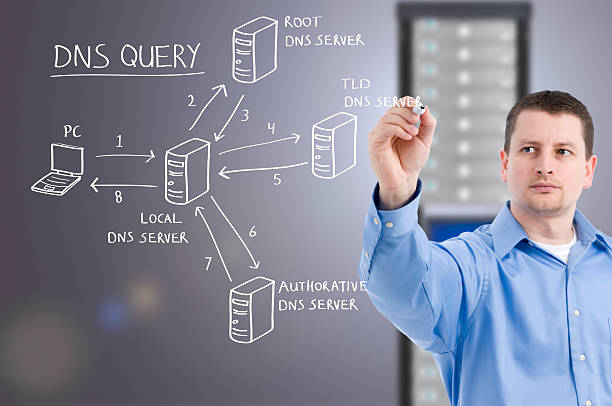
How a DNS Lookup Works
Whenever you enter a website address into your browser, several systems work together to locate the correct server.
Step 1: You Enter a Domain Name
For example:
www.example.comAt this point, your browser knows the website’s name but not its IP address.
Step 2: Browser Cache
The browser first checks whether it has recently visited the website.
If the address is already stored locally, no additional lookup is required.
Step 3: Operating System Cache
If the browser has no record, your computer checks its own DNS cache.
Operating systems temporarily store recently resolved addresses to improve performance.
Step 4: Recursive Resolver
If no cached record exists, the request is sent to a recursive DNS resolver.
This server is usually operated by:
- Your Internet Service Provider (ISP)
- A public DNS provider
- Your organization
The resolver performs the search on your behalf.
Step 5: Root Name Server
The recursive resolver contacts one of the internet’s root name servers.
The root server does not know the final IP address, but it knows where to find the correct Top-Level Domain (TLD) server.
Step 6: Top-Level Domain (TLD) Server
The TLD server manages domains ending in extensions such as:
- .com
- .org
- .net
- .edu
- .io
- .co
It directs the resolver to the domain’s authoritative name server.
Step 7: Authoritative Name Server
The authoritative server stores the official DNS records for the domain.
It returns the correct IP address to the recursive resolver.
Step 8: The Browser Connects
The resolver sends the IP address back to your browser.
Your browser can now connect directly to the web server and begin loading the website.
The DNS Lookup Process
User
   │
   ▼
Browser Cache
   │
   ▼
Operating System Cache
   │
   ▼
Recursive DNS Resolver
   │
   ▼
Root Name Server
   │
   ▼
Top-Level Domain Server
   │
   ▼
Authoritative Name Server
   │
   ▼
Web Server
Although this looks complex, the process typically completes in just a few milliseconds.
Types of DNS Servers
Understanding the different DNS servers makes troubleshooting much easier.
Recursive Resolver
Accepts DNS queries from users and searches for answers on their behalf.
Root Name Server
Directs requests toward the appropriate Top-Level Domain server.
Top-Level Domain Server
Knows which authoritative server manages a particular domain extension.
Authoritative Name Server
Stores the official DNS records for a domain and provides the final answer.
Why DNS Is Distributed
Imagine if every website lookup depended on one server.
If that server failed, much of the internet would become inaccessible.
DNS avoids this problem by distributing information across many servers worldwide.
Benefits include:
- Faster lookups
- Improved reliability
- Better redundancy
- Greater scalability
- Higher availability
This distributed architecture is one reason the internet remains resilient even during localized failures.
DNS Caching
To improve speed, DNS information is temporarily stored at several levels.
Caching may occur in:
- Web browsers
- Operating systems
- Routers
- Recursive resolvers
Caching reduces unnecessary lookups and speeds up website loading.
However, it also means that DNS changes may not appear immediately.
Common DNS Problems
DNS issues are among the most common causes of website connectivity problems.
Typical examples include:
- Incorrect DNS records
- Expired domain names
- Misconfigured nameservers
- Corrupted local cache
- DNS propagation delays
Understanding the lookup process makes these issues easier to diagnose.
Common Misconceptions
Myth: DNS Stores Websites
False.
DNS stores information about where websites can be found, not the websites themselves.
Myth: DNS Is Only Used for Websites
False.
DNS also supports:
- Email delivery
- Cloud services
- APIs
- Voice over IP (VoIP)
- Many other internet applications
Myth: DNS Changes Are Instant
False.
DNS changes require time to propagate because cached information must expire before updated records are used.
Best Practices
Use Reliable DNS Providers
A dependable DNS service contributes to faster responses and improved availability.
Document DNS Changes
Maintain clear records of DNS modifications to simplify troubleshooting.
Learn Basic DNS Records
Understanding common records such as A, AAAA, CNAME, MX, and TXT makes website management significantly easier.
Frequently Asked Questions
Does every website use DNS?
Almost every publicly accessible website relies on DNS to translate domain names into IP addresses.
Can I browse the internet without DNS?
Technically, yes—if you know the exact IP address of the server. In practice, DNS is what makes the internet convenient and easy to use.
Why is DNS sometimes called the internet’s phone book?
Because it maps human-readable names to numerical addresses, much like a phone directory maps names to phone numbers.
What happens if DNS fails?
If DNS cannot resolve a domain name, your browser cannot locate the server, even if the website itself is online.
Lesson Summary
The Domain Name System is one of the internet’s most important services. It translates domain names into IP addresses, allowing people to browse the web using memorable names instead of numerical addresses.
Its distributed architecture, caching mechanisms, and hierarchical structure make DNS both scalable and highly reliable. Understanding how DNS works is a fundamental skill for anyone interested in websites, networking, or cloud technologies.
Knowledge Check
1. What is the primary purpose of DNS?
A. Encrypt internet traffic
B. Translate domain names into IP addresses
C. Store website files
D. Register websites
Answer: B
2. Which DNS server stores the official records for a domain?
A. Browser Cache
B. Recursive Resolver
C. Authoritative Name Server
D. Root Name Server
Answer: C
Key Takeaways
- DNS translates domain names into IP addresses.
- DNS uses a hierarchical and distributed architecture.
- Browsers and operating systems use caching to speed up lookups.
- Multiple DNS server types work together to resolve requests.
- Understanding DNS simplifies website management and troubleshooting