Ways To Take A Screenshot On A Mac

The built-in screenshot capabilities on a Mac can be used to capture a screenshot.  the following steps can be used:

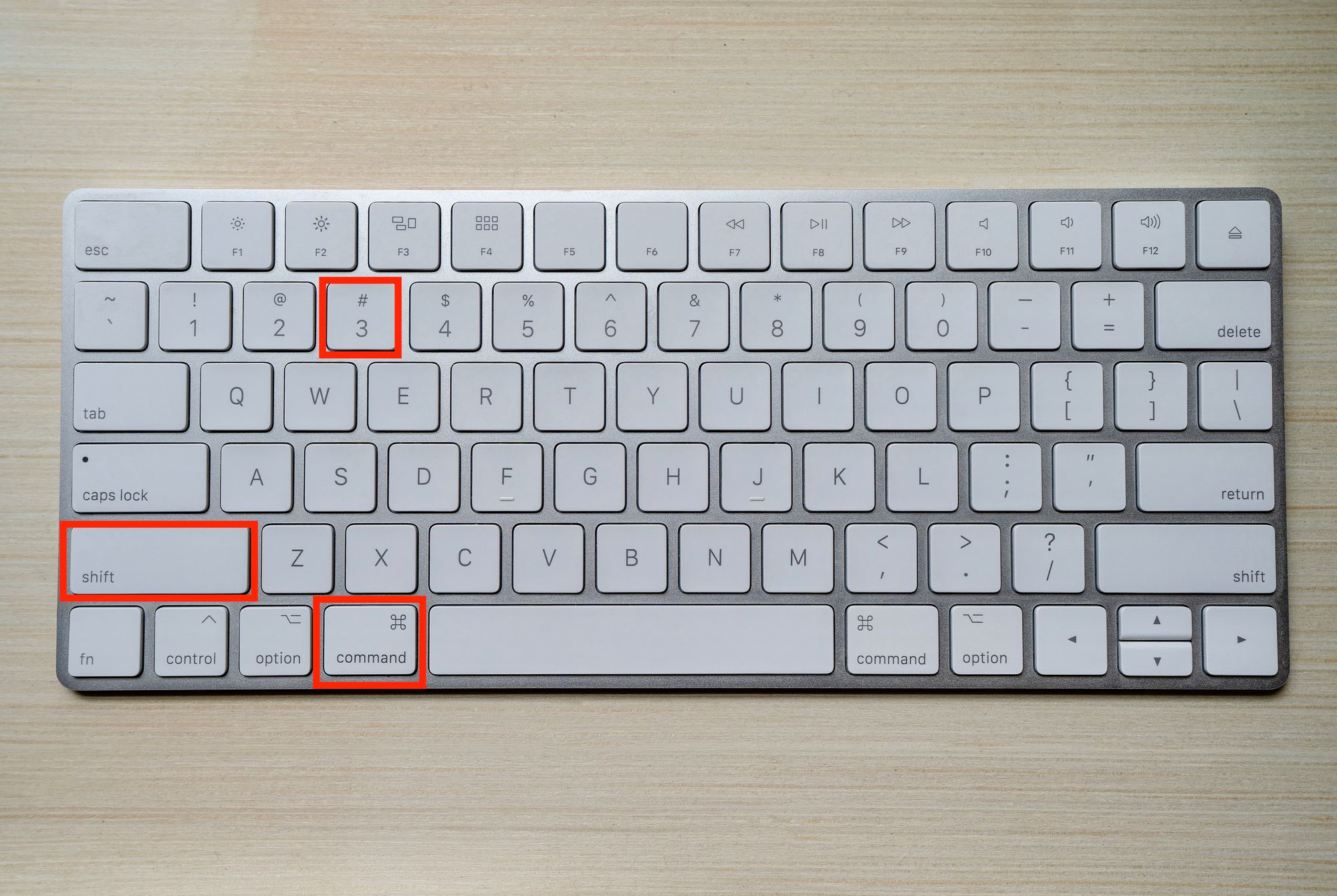
Press Command () + Shift + 3 to take a screenshot of the full screen. A camera shutter sound will be heard, and the screenshot will then be saved to your desktop.

2. Press Command () + Shift + 4 to select a specific area of the screen to be captured. A crosshair will replace your cursor. Select the area of the screen you wish to capture by clicking and dragging the crosshair. The screenshot will be saved to your desktop when you let go of the mouse button.

3. use Command () + Shift + 4, then use the Spacebar to choose a specific window. A camera symbol will appear in place of your cursor. Place the camera icon above the desired window it will be marked in blue and available for capture. To take a screenshot, press the mouse button. Your desktop will store the screenshot.

4. Press Command () + Control + Shift + 3 (for the whole screen) or Command () + Control + Shift + 4 (for a single window or portion of the screen) to take a screenshot and copy it to the clipboard rather than saving it to your desktop.

There are additional choices and settings available in the Screenshot software, but these are the fundamental keyboard shortcuts for taking screenshots on a Mac. Simply hit Command () + Shift + 5 to open the app.

Hot this week

Best Place to Buy a cPanel License Online in 2026 — Full Comparison

Anyone who searches "best place to buy a cPanel...

Buying Your First cPanel License — A Complete Beginner’s Guide for 2026

If you've never bought a cPanel license before, the...

Buying Multiple cPanel Licenses? How Resellers Save Big on Bulk Pricing in 2026

Once a hosting provider moves past a single server,...

How Much Does a cPanel License Really Cost in 2026? The Full Price Breakdown

Anyone shopping for a cPanel license quickly discovers that...

CP Guard License — Affordable Server Security for cPanel Hosting in 2026

Most hosting providers think of Imunify360 as the complete...

Topics

Best Place to Buy a cPanel License Online in 2026 — Full Comparison

Anyone who searches "best place to buy a cPanel...

Buying Your First cPanel License — A Complete Beginner’s Guide for 2026

If you've never bought a cPanel license before, the...

Buying Multiple cPanel Licenses? How Resellers Save Big on Bulk Pricing in 2026

Once a hosting provider moves past a single server,...

How Much Does a cPanel License Really Cost in 2026? The Full Price Breakdown

Anyone shopping for a cPanel license quickly discovers that...

CP Guard License — Affordable Server Security for cPanel Hosting in 2026

Most hosting providers think of Imunify360 as the complete...

WHMReseller License — What It Is and Why Every Hosting Reseller Needs It

Anyone running a reseller hosting business eventually runs into...

Tremhost License Review — Are Shared Hosting Licenses Worth It?

Anyone shopping around for cPanel, CloudLinux, LiteSpeed, or Imunify360...
spot_img

Related Articles

Popular Categories

spot_imgspot_img